Your every Google search keyword is out there somewhere even if you have deleted your browser history. We know it is daunting news. However, the good thing is you are aware of this now. We will tell you how you can see every Google search you’ve ever made, even if you've deleted your history. Also, we will share our secret trick to vanish your Google search history forever. Are you ready to see some of the most embarrassing things you have searched in the past?

Here's How You Can See Every Google Search You’ve Ever Made, Even If You've Deleted Your History
By
Editorial Staff in
Facts
On 18th September 2016
advertisement
#1
First of all, it is important for you to understand that deleting your browser history is not enough as it doesn't delete anything at all. Your Google searches are pretty much saved forever, from the very first one till the recent search.

#2
However, the good news is your searches will be saved only if you have logged into your Gmail or Google account. In case, you are dying to see every Google search you have ever made, visit history.google.com/history. Beware, there are some embarrassing moments ready to explode in your face.

advertisement
#3
In this link, you can see each and every search term. The search function allows finding specific items from the search history by typing keywords or terms. So if you are afraid of any particular group of keywords, you can locate them quickly in your Google search history.
#4
This history is very elaborate. You can see the Google image search history. Also, you can view every Google Map that you have utilized in the past. We don't know if it's a good thing or bad, you can download this search history as well.
advertisement
#5
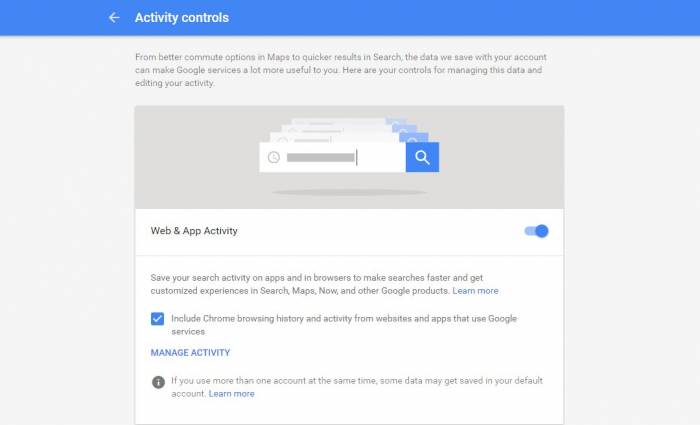
If you want to stop Google from recording everything, you need to open myaccount.google.com. Under "Personal info & privacy", you will find an option called "Manage your Google Activity". Here you can handle the Google search history.
advertisement
#6
You will find the option to pause the tracking by Google. Now it is up to you if you want to halt the recording of your Google searches or not. There is no need to panic about your Google search history because only you can access it. However, make sure that you never leave your Google account logged on a public device.