Did You Know These Easy Tricks For Easier And Safer, Facebooking? Well, Now You Do
By
Johny in
Amazing
On 23rd May 2015
Oh, Facebook. It seems like everyone uses it grudgingly, but everyone uses it. On one hand, it's a fun, easy way to stay in touch with people you might otherwise never communicate with, and on the other, it's a data-mining nightmare where people are reduced to marketing demographics . And let's not even talk about the 34,595 invitations to play Candy Crush from the same person.
However, Facebook is more malleable than most people might realize, and you actually have much more control over who sees what than you might think. You just have to dig a little.
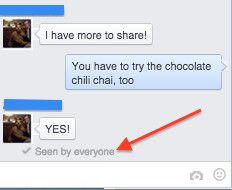
#1 Disable the "seen" notification on Facebook messages.
The "seen by everyone" notification usually happens in group chats, and it can make things awkward if you don't respond. If you prefer not to have everyone know you've seen their message until you feel like answering, you can do one of two things. If you're using Chrome as your browser, you can use the Chrome extension Facebook Unseen, which blocks the URL that sends the notification to Facebook. This extension will make it so that it always appears as though you have unread messages unless you reply. If you're not using Chrome, install AdBlock Plus, and then enter the following into the custom filters: "facebook.com/ajax/mercury/change_read_status.php$xmlhttprequest"
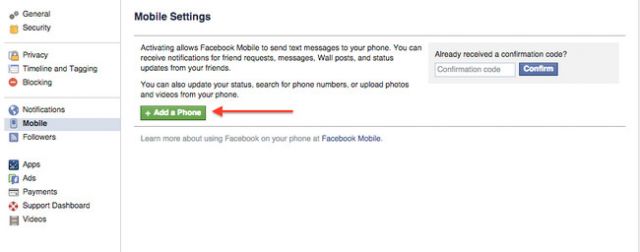
#2 Post to Facebook when you're not on Facebook.
If you're traveling, have slow WiFi, or don't have access to Facebook for whatever reason, you can actually still post text, videos, and photos. Simply go to your Settings page and select Mobile from the menu on the left. You'll have to add your phone number to sign up for Facebook texts, and then you'll receive a post-by-email address. You can use this email address to post to Facebook from your phone, even if you don't have a Facebook app. To add a caption, put it in the subject line. The photos and videos uploaded will be public, but you can edit the privacy settings later.
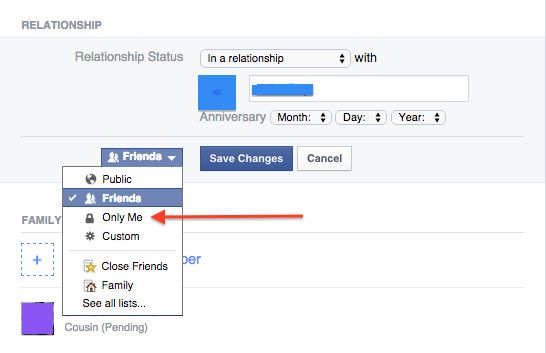
#3 Change personal information without everyone knowing about it.
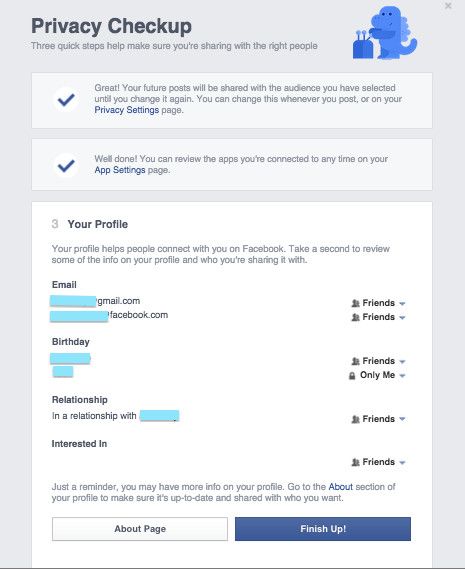
Each piece of information in your "About" section can be edited, and each one comes with a blue drop-down menu that describes who can or cannot see this information. If you want something to be totally private, select "Only Me." If you want some people to be aware and some not, you can also customize your list.
#4 Use emojis with abandon.
If you're one of those people who uses emojis to communicate, rejoice. Facebook supports them. If you're on a computer, you can use a browser extension like Show Me Emoji! to include these little hieroglyphs in statuses, comments, and captions. If you're on an iPhone, you can actually select "emoji" from your keyboard settings menu. When you're typing something in, tap the little world-shaped icon to the left of the keyboard to switch from actual human speak to emoji and back.
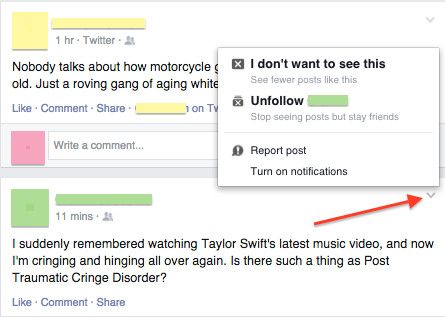
#5 Take a break from status addicts.
We all have at least one super-annoying friend who posts a new update every 0.034 seconds about everything. Or maybe you'd just like to avoid seeing novel-length political rants from your relatives without unfriending them. Click on the down-pointing arrow in the upper right corner of their status box. You'll get an option to unfollow them, which means you'll stay friends, but you'll also have a little breathing room. If you want to see more of them, you can also turn on notifications in the same place, which will alert you every time this person posts something. And if someone posts something inappropriate, you can also report the content. Only use that for things that are really in violation, though, not just because you dislike it.
#6 Prevent people from seeing status updates.
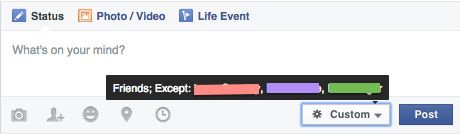
You can also hide yourself from certain people on Facebook. Maybe there are colleagues that don't need to know about your crazy Friday night, or maybe there are relatives who wouldn't appreciate your love of Cannibal Corpse lyrics. When you go to post a status, you can select the gray button to the left of "Post" and create custom lists of people who will not be able to see your status updates. Select "Custom" from the menu and add names to the list of people you'd rather leave out of the loop. Be aware, though, that if they go to your profile, they will still be able to see them. You just won't show up on their feed.
#7 Check your privacy.
Click on your privacy settings in the upper right corner and get a privacy checkup. This is a quick overview of your settings and who can see what. You can also go into more detail on the main privacy settings page and fine-tune your Facebook presence until you're comfortable.